Skip to content

UUTA 2.0 arrives 3 November 2026
Free for 21 days, then $14.99 once.

From Srutva Labs · Coming 3 November

One tap when I notice it.

A private place for one thing I name in my own words. When I notice a pull, I tap “I noticed it.” A three-minute pause can follow, or I skip it. Then Patterns shows when those moments come.

The App Store has UUTA 1.1 today; 2.0 comes as a free update on 3 November.

Today on iPhone: the “I noticed it” button, this week’s days and “How are things?”

How it works

Notice. Pause, if I want. Look back.

One tap. Nothing to type.

Notice

One button: “I noticed it.”

One focus, named in my own words; until I rename it, it is called Private. The same tap is on the widgets, in Control Center, on the Action button, and in Shortcuts and Siri. Nothing to type.
The pause on iPhone: “Waiting with it”, a timer at 1:54 of 3:00, with “It passed” and “I went with it” side by side

Pause

Three minutes, if I want them.

“It passed” and “I went with it” are there from the first second, side by side, the same size. I can skip the wait. Where I was, who was around and how I felt are optional taps.

Patterns on iPhone

Patterns

When the moments come.

A 24-hour clock of the times of day, what was around them, and twelve weeks at a glance. It counts and describes. No targets, no advice.

On iPad

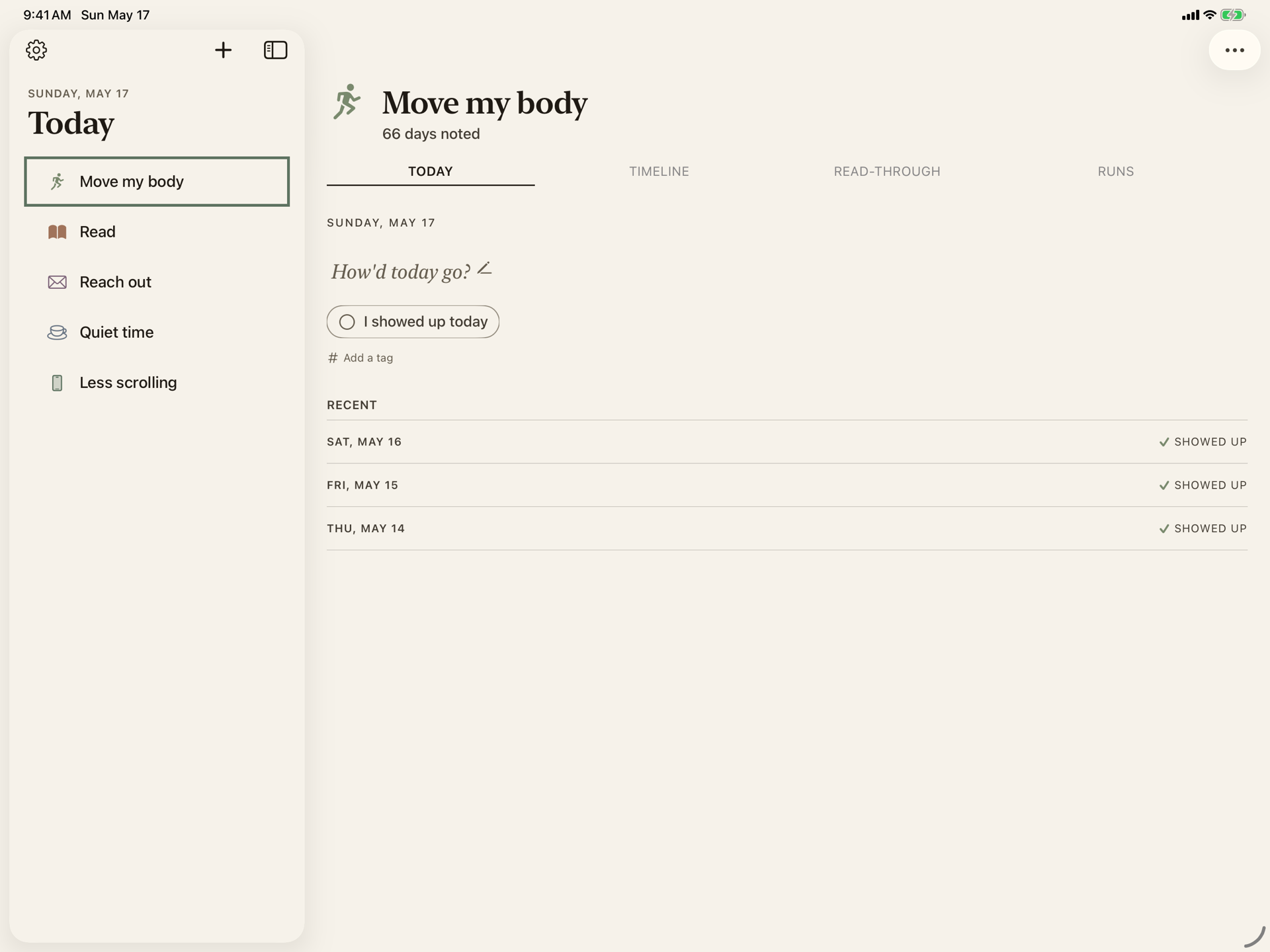
On iPad, a sidebar and two columns.

The tabs become a sidebar. Today opens in two columns, Settings sits beside its list, and the keyboard has shortcuts. The same app, the same purchase, and with iCloud on, the same moments.

UUTA on iPad in landscape: the sidebar, and Today in two columns

On Apple Watch

On Apple Watch, a double tap.

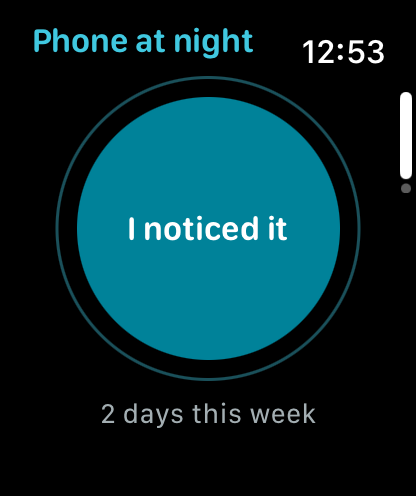
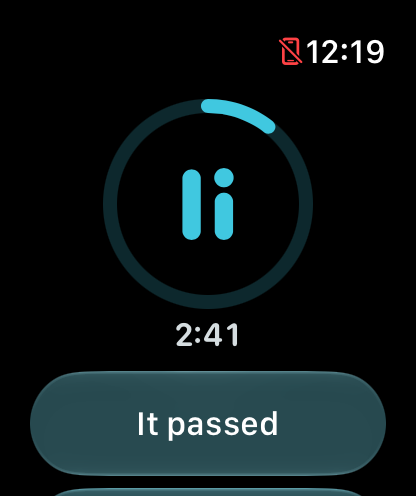
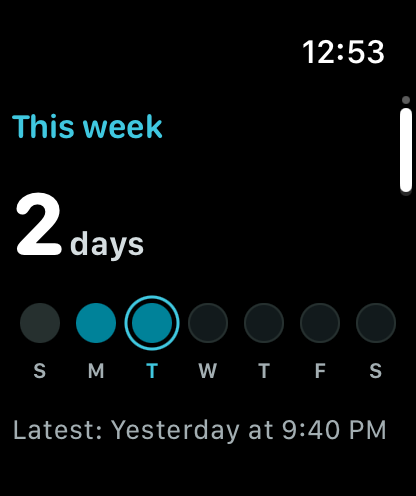
A double tap of thumb and finger logs a moment without touching the screen. The three-minute pause runs on the wrist, “It passed” and “I went with it” the same size, and This week shows which days had a moment. Complications, the Smart Stack and a Control Center control are one tap away and name nothing. Moments reach my iPhone; if it is away, they arrive when it is back.

Apple Watch with watchOS 27.

“I noticed it” on Apple Watch: the focus’s name at the top, the disc, and “2 days this week”
The pause on Apple Watch: a ring around the mark, 2:41 left, and “It passed”
This week on Apple Watch: “2 days”, a dot over each day’s letter, today ringed, and “Latest: Yesterday at 9:40 PM”

Outside the app

One tap away, and nothing that names it.

Widgets for the Home Screen and Lock Screen show which days had a moment. A Control Center control, the Action button, and Shortcuts and Siri log one with a tap. While the phone is locked, the pause runs as a Live Activity whose two buttons work from the Lock Screen and the Dynamic Island. None of them shows the name I gave my focus or what I wrote.

Who it's for

Adults who want to see a pull clearly.

Some people use UUTA for the pull to keep scrolling. Some for opening one app again and again. Some for something they name only to themselves. UUTA asks the same question of each, and judges none of them.

It is for adults, 18 and over. It is not medical care, gives no advice, and promises no result.

Shield, free

One calm question before the apps I choose.

With Screen Time, Shield puts a pause screen in front of the apps, groups and websites I pick: “Still want to open this?”, with “Not now” and “Open for 15 min”. Stricter hours can cover the night, with “Not now” alone. A notice can come after 15 minutes in the chosen apps, and Apple's own filter for adult websites can be turned on.

Every switch turns off from the app. UUTA never learns which apps I chose. Shield stays free after the free days.

Price

Free for 21 days, then one payment.

Everything is free for 21 days, and nothing is charged when they end. After that, an optional $14.99 purchase keeps new logging, writing a line, the pause and Patterns available. No subscription, no ads.

My existing records stay available whether I buy or not. If I bought UUTA before 2.0, everything stays unlocked.

$14.99 is the U.S. price. The App Store shows the price for my region before I pay.

Questions and answers ›
21
days free
$14.99
once, no subscription

After the 21 free days

Still free
Shield and widgets. Reading and editing existing records, Save a copy, My report, Recently deleted and Erase everything.
With the one-time purchase
Keep noting new moments, writing new lines, taking the optional pause and viewing Patterns.

“It passed.” “I went with it.” The same weight.

Built in

Privacy, accessibility, and language, from the first version of 2.0.

Privacy

No account. No server.

No analytics, no ads, no third-party code. Moments stay on my iPhone or iPad and, only if I turn it on, in my own iCloud.

Accessibility

For every way of reading.

VoiceOver labels on every control, Dynamic Type and Dark Mode, with Increase Contrast, Reduce Transparency and Reduce Motion each handled.

Worldwide

In 32 languages.

Right-to-left scripts included. iPhone, iPad and Apple Watch, one purchase for all.

What UUTA isn't

What it leaves out.

  • No targets, no numbers that rank me, no celebrations.
  • No community, no messages, no sharing inside the app.
  • No reminders to come back. A notice only if I turn one on.
  • No account, no analytics, no ads, no tracking.
  • Not medical care. No advice. No promised result.

Privacy

The people who make UUTA cannot read what I note.

No account. No server of ours. No analytics, no third-party code. Moments stay on my iPhone or iPad and, only if I turn it on, in my own iCloud, where the lines I write are encrypted. Face ID keeps the app locked, and the app switcher shows a cover. The App Store privacy label reads “Data Not Collected.”

Read the privacy policy ›

On the App Store, for iPhone and iPad, and Apple Watch.

Free for 21 days, then $14.99 once. No subscription. Shield stays free.

The App Store has UUTA 1.1 today; 2.0 comes as a free update on 3 November.